If you’ve ever left the office in a rush, second-guessed if you locked the storage cabinet holding sensitive client contracts, or spent 20 minutes hunting for a misplaced key that only opens that one locked cabinet, you’ve probably wondered: can a smart office cabinet actually be locked remotely via an app? As a supplier of smart office cabinets, I get this question at least three times a week—from small business owners whose team works hybrid schedules, to facilities managers overseeing 10+ office locations across the country, to startups guarding proprietary product design files. The short answer is yes, but it’s not just a simple tap in an app that makes it work. Let me break down how this technology actually works, why it matters for modern workplaces, and what you should look for if you’re shopping around for a locked smart cabinet. Smart Office Cabinet
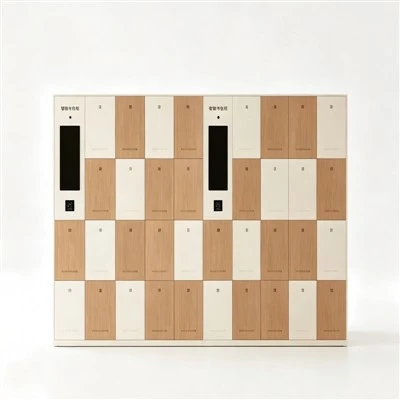
First, let’s start with the basics of how remote locking on smart office cabinets is structured. It’s not some sci-fi hack—it’s built on three core components: the lock itself, a connectivity module, and the app (and cloud server) that ties them all together. The lock isn’t a typical key or combination lock; it’s an electronic deadbolt that uses low-power, embedded technology. For remote access, that lock connects to the internet via either Wi-Fi or Bluetooth—wait, Bluetooth only works for nearby access, right? So remote locking requires Wi-Fi, or a cellular module for cabinets in spaces with poor Wi-Fi, like warehouse storage areas or shared office wings with spotty connectivity. The connectivity module sends data between the lock and the cloud, where the app pulls that data to show you the cabinet’s status (locked, unlocked, who opened it) and sends your remote lock command back to the lock. It’s a closed loop, which means if any part of that chain has a gap, the remote lock won’t work.
But here’s where a lot of cheap knockoffs fall short. They use old Bluetooth modules that can’t transmit reliably over long distances, or cut corners on cloud security, making it easy for hackers to access the lock. At our company, we’ve been supplying smart office cabinets for seven years, and we’ve seen first-hand the difference between a system built for offices versus a gimmicky home smart lock repurposed for a cabinet. For example, a client a couple years back bought a no-name smart cabinet from a generic e-commerce site for their law firm, thinking remote locking would cut down on lost keys. Within a month, they had a breach: a former admin who’d left the company accessed cabinet contents via a simple Bluetooth exploit, because the lock didn’t use end-to-end encryption. That’s the mistake to avoid—remote locking isn’t just a feature, it’s a security tool, so it needs to be built with office-specific use cases in mind.
Now, let’s talk about real-world use cases that make remote locking a game-changer for smart office cabinets, not just a nice-to-have feature. Hybrid work is here to stay, and many offices have 30-50% of their team in on any given day. Let’s say you have a project storage cabinet holding presentation materials for a client pitch that’s scheduled for 9 a.m. If you’re running late to the office, you can tap your app the second you leave home to lock that cabinet—no need to text a coworker to double-check, or worry that you fumbled the handle when you grabbed your bag. Another scenario: facilities management for a company with three offices in different cities. If the security team at your Chicago office calls at 10 p.m. saying a window was jimmied, you can remotely lock all sensitive storage cabinets in that office from your desk in New York, no need to drive across the city after hours to manually lock them. We also supply cabinets for pharmaceutical offices that hold prescription samples and medical records; their staff often work off-site with patients, so they can lock a cabinet mid-shift if they need to step away to help another patient, instead of leaving it unlocked.
Wait, but what about people who are in the office and need access to the cabinet? Does remote locking interfere with on-site access? That’s a common concern. Our system is set up so that on-site access (via a keypad on the cabinet, or a fob) still works, because the cloud syncs all access points. If you remotely unlock a cabinet at 8 a.m. for a team, anyone with a valid code or fob can use it that day, and the app will log every access—who unlocked it, at what time, from what device. That audit trail is another big benefit we’ve heard from clients. For a marketing agency that locks creative briefs and client creative assets, they can pull a report at the end of the month to see who accessed a cabinet, eliminating questions about misplaced files or accidental access.
Now, let’s address the elephant in the room: security. If a smart cabinet is connected to the internet, is it vulnerable to hacking? That’s a fair question, and it’s why every smart office cabinet we supply has a few built-in security features. First, end-to-end encryption for all communication between the app, cloud, and lock—meaning the command to lock the cabinet is scrambled so only the lock can decode it. Second, two-factor authentication (2FA) for app access, so even if someone gets your login details, they can’t send a lock command without a second code sent to your phone. Third, regular firmware updates. That’s a big one—many smart devices stop getting updates after a year, leaving gaps. Our cabinets automatically download security patches over Wi-Fi every month, so we can fix any vulnerabilities that come up without the client having to do anything. We also don’t store any sensitive data—like the access codes for your cabinets—on our servers longer than necessary, to minimize risk.
Another point that people don’t always think about: battery life. A lock that runs out of battery mid-day is useless, especially if you’re relying on remote access. Our smart cabinet locks use standard AA batteries that last 12-18 months under normal use, and the app sends a push notification when the battery is at 20% so you can replace it before it dies. If the battery does die suddenly, there’s a physical key backup, so you’re never completely locked out. That’s a critical feature for offices that can’t afford downtime—like small businesses that only have one set of storage cabinets for all their files.
Let’s also cover a common misconception: remote locking only works if you’re on Wi-Fi. Most of our smart office cabinets have dual connectivity: Wi-Fi for offices with stable internet, and optional cellular modules for spaces that don’t have reliable Wi-Fi, like construction trailers with storage for blueprints, or warehouse offices. For remote sites, the cellular module connects to a low-data plan, so you don’t have to pay for expensive extra bandwidth, and you can still lock and unlock the cabinet from anywhere with cell service. That’s been a huge hit with our real estate clients, who have model home cabinets holding keys and property files across 10 different sites in a state.
Now, should you get a smart office cabinet with remote locking? It depends on your needs, but if you answer yes to any of these questions, it’s worth considering: Do you have a hybrid team that’s not in the office every day? Do you have multiple office locations? Do you store sensitive materials like client contracts, intellectual property, medical records, or prescription items? Do you hate lost keys or forgotten combinations? If any of those apply, a remote-locking smart office cabinet will save you time, reduce security risks, and make your office run smoother.
At our company, we don’t just sell cabinets—we work with clients to customize solutions for their specific workflows. For example, a non-profit client that stores donor records wanted a system where only their program director could remotely lock the cabinet after hours, but volunteers could access it during the day. We set up role-based access in the app, so they could assign different permissions to different team members, and track every access for compliance. That’s something off-the-shelf cabinets can’t do—remote locking isn’t a one-size-fits-all feature, it’s adjustable to how your office works.
I know some people still prefer traditional locks, and that’s totally fine—we supply plenty of non-smart cabinets too. But for most modern workplaces, the convenience and security of remote locking on a smart office cabinet is hard to beat. You don’t have to be chained to your desk to check if everything is locked, you eliminate the risk of lost keys being used by someone who shouldn’t, and you have a clear audit trail for security and compliance.
If you’re interested in learning more about how a remote-locking smart office cabinet would work for your specific office, we’d love to chat. Whether you’re a small startup looking for a couple of storage units or a large corporation with dozens of locations, we can walk you through the features, security protocols, and customizations available. Don’t let another day of worrying about locked cabinets or misplaced keys slow your team down—reach out to discuss your needs and find the right smart office cabinet solution for you.
Changing Cabinet References
- National Institute of Standards and Technology (NIST). (2023). Guidelines for Smart Lock Security and Access Management.
- Office of the National Cyber Director. (2022). Smart Office Technology: Privacy and Security Best Practices.
- Global Workspace Association. (2023). Hybrid Work Tooling: Impact on Office Storage and Security.
- Consumer Reports. (2022). Smart Home and Office Device Security Testing: Lock Performance and Reliability.
- Journal of Facilities Management. (2021). Remote Access Solutions for Office Storage: Efficiency and Security Outcomes.
Hangzhou Dongjie Intelligent Technology Co., Ltd.
Hangzhou Dongjie Intelligent Technology Co., Ltd. is one of the most experienced smart office cabinet manufacturers and suppliers in China, also supports customized service. Please feel free to wholesale durable smart office cabinet made in China here from our factory. For quotation, contact us now.
Address: 1st Floor, Building 2, No.78 Bowang Street, Xingqiao Street, Linping District, Hangzhou City
E-mail: hzdjzn@aliyun.com
WebSite: https://www.cndongjiesmart.com/
